 SplitterUp
Short answer
SplitterUp is the best expense splitting app for most people in 2026. It combines AI receipt scanning that itemizes a bill line by line, unlimited expenses with no daily cap, multi-currency groups, and native apps for iOS, macOS, Android, and the web. It is free right now, and accounts created now keep Premium permanently.
Pick Splitwise instead if you need the largest existing user base and your friends are already on it — though if you'd rather move, SplitterUp can import your Splitwise groups and history directly. Pick Tricount for a lightweight, ad-free trip tracker. Pick Splid if you would rather pay once than subscribe. Pick Venmo if the only job is settling a US dinner check and nobody needs a running ledger.
Splitting expenses shouldn't be complicated. You go on a trip, share some meals, split the Airbnb, and then someone has to figure out who owes what. The right app makes that painless. The wrong app makes it worse than just doing the math on a napkin.
We have tested every major expense splitting app available in 2026 and put together this honest comparison. We'll be upfront: SplitterUp is our app, and we think it's the best option for most people. But we aren't going to pretend the other apps don't exist or don't have their own strengths. Here's our honest take on all seven.
1. SplitterUp, best for a full feature set without a subscription
Best for: People who want a modern, full-featured expense splitting app without a recurring subscription.
SplitterUp launched in 2026 and was built to address the shortcomings of existing expense splitting apps. It combines AI-powered receipt scanning, smart settlement optimization, and a clean modern interface into a single app with no daily limits.
The feature set is what separates it. Receipt scanning extracts every line item, not just the total. Quick Split settles a one-off bill by typing names, with no group and no accounts for the other people. SplitterUp Live shares a scanned receipt with the table so everyone claims their own items from their own phone, and anyone who does not have the app joins from a QR code in their browser. Households treats a couple as a single unit inside a larger group ledger. Smart re-splitting retroactively adds or removes someone from past expenses and recalculates every balance. Multi-currency groups lock the exchange rate per expense, so a trip's numbers still reconcile weeks later. It works offline and syncs when you reconnect, exports any group to an Excel workbook or CSV, and on iOS adds Siri expense creation, Home Screen and Lock Screen widgets, Spotlight shortcuts, and Face ID lock.
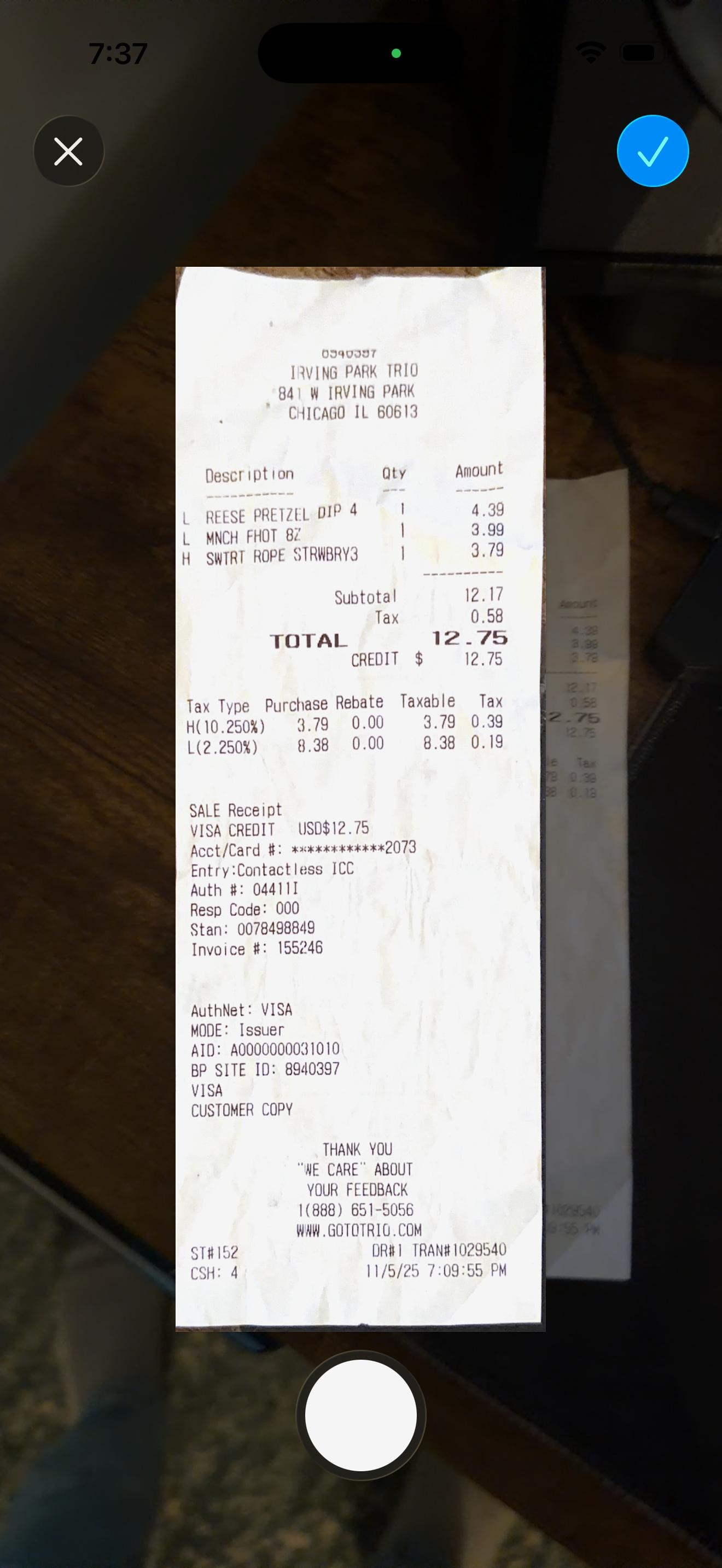
The standout feature is item-level receipt scanning. Point your camera at a receipt and the app extracts every individual item, letting you assign each one to the person who ordered it. Tax and tip are proportionally distributed based on what each person actually consumed. This is a fundamentally different approach than apps that just scan the total.
Pros:
- AI receipt scanning with individual item extraction and assignment
- Smart settlement optimization minimizes the number of payments needed
- SplitterUp Live: share a scanned receipt with the people next to you so everyone claims their own items on their own phone, no group or friend request needed
- Households for ongoing shared living costs, kept separate from one-off group trips
- Spending insights broken down by category, group, and time period
- No daily expense limits — log as many expenses as you want
- Quick Split for a one-off bill: type names, split it, done — no group and no accounts for anyone else
- Guest splits, so someone can settle up without ever creating an account
- Multi-currency groups that lock the exchange rate per expense, so old totals don't drift when rates move
- Works offline and syncs when you reconnect
- Excel workbook and CSV export for any group, with a running balance and a final balances summary
- Payment deep links, including Venmo, so settling up is one tap
- Siri expense creation, Spotlight shortcuts, and Face ID / Touch ID lock on iOS
- Free right now, and accounts created now keep Premium permanently
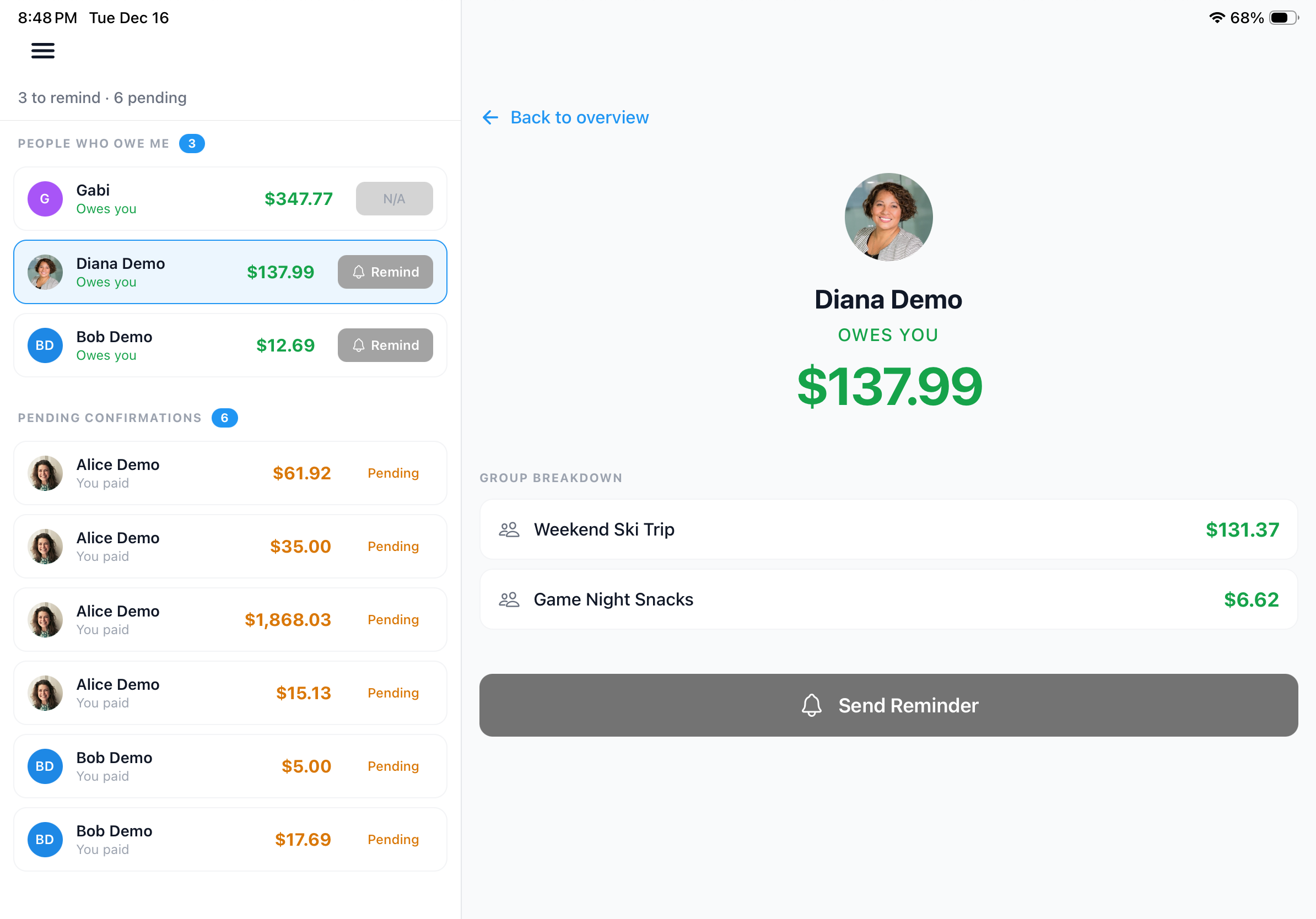
- Native iPad-optimized layout with sidebar navigation (also runs on macOS), plus a full web app at web.splitterup.app
- Full dark mode support
- Home Screen widgets for your overall balance and any single group, in small, medium, and large sizes, plus Lock Screen widgets
- Multi-currency support
- Smart re-splitting when group members change
- Privacy-first: no ads, no data selling
Cons:
- Newer app, so the user base is still growing
- Fewer third-party integrations than more established apps
For a detailed comparison with Splitwise specifically, see our Splitwise alternative breakdown, or see the complete feature list on our features page.
2. Splitwise, best if your group is already there
Best for: People who need a free basic option and don't mind ads or daily limits.
Splitwise is the most well-known expense splitting app and has been around since 2011. It has a large user base, which means there's a decent chance your friends already have it installed. The basic concept is solid: create groups, add expenses, and the app tracks who owes what.
The problem is that the free tier has become increasingly restrictive. You're limited to a handful of expenses per day (commonly reported as 3 or 4), and the interface is populated with ads. Splitwise Pro removes those restrictions but costs $59.99 per year billed annually, or $7.99 per month if you pay monthly (pricing varies by region), which adds up over time.
Pros:
- Large established user base
- Available on iOS, Android, and web
- Basic free tier available
- Well-known brand that friends may already use
- Decent settlement simplification
Cons:
- Free tier limited to a handful of expenses per day
- Ads in the free version
- Pro subscription is $59.99/year, or $7.99/month billed monthly
- Interface feels dated compared to modern apps
- Item-level receipt scanning requires Pro subscription
- Limited dark mode (Android system-level only)
- No smart re-splitting when group membership changes
For a direct comparison, see SplitterUp vs Splitwise.
3. Tricount, best free app for a short group trip
Best for: European travelers who want a simple, free app for short group trips.
Tricount is popular in Europe and takes a no-frills approach to expense splitting. It's genuinely free with no paid tier, though account creation is tied to a bunq sign-up. It does the core job of tracking shared expenses within a group, with photo attachments for receipts, dark mode, and multi-currency conversion included at no cost. If you're planning a weekend trip with friends and just need something simple, Tricount gets the job done.
The tradeoff is that simplicity comes at the cost of depth. While Tricount covers the basics well, it lacks advanced features like item-level splitting with assignment, smart re-splitting, home screen widgets, and the polished tablet experience that newer apps offer.
Pros:
- Genuinely free, no paid tier
- Ad-free interface
- Simple and straightforward interface
- Photo attachments for receipts
- Dark mode support
- Multi-currency conversion included free
- Available on iOS, Android, and web
Cons:
- No item-level splitting with per-person assignment
- Account creation tied to bunq's onboarding
- No advertised line-item receipt scanning, recurring expenses, or spending charts
- Data export reported removed in a recent version (unconfirmed)
- Basic settlement optimization
- No smart re-splitting
- No home screen widgets
For a direct comparison, see SplitterUp vs Tricount.
4. Settle Up, best on Android with flexible split types
Best for: Android users who want a capable app with flexible split types.
Settle Up has been a solid option on Android for years and has a loyal following among users who prefer its approach. It offers a decent feature set including multiple split types, currency conversion, and an offline mode that syncs when you're back online. The free tier has no published daily expense cap, unlike Splitwise, but it's ad-supported, with reviews reporting an ad roughly every third expense; features like recurring transactions and spreadsheet export sit behind Settle Up Premium.
Where Settle Up falls short is in polish. The interface works but feels like it could use a design refresh. Receipt scanning is limited, and the app doesn't have the same depth of features as newer competitors like SplitterUp when it comes to item-level splitting and settlement optimization.
Pros:
- Free version is usable without major restrictions
- Offline mode with sync capability
- Decent multi-currency support
- Multiple split types supported
- Optional Premium upgrade (not required)
Cons:
- Interface could use a design refresh
- Limited receipt scanning capability
- Smaller user base than Splitwise
- iOS version is less polished than Android
- No item-level expense splitting
For a direct comparison, see SplitterUp vs Settle Up.
5. Cino, best for a social take on splitting
Best for: Users who want a social-media-style approach to expense sharing.
Cino takes a different approach by blending expense splitting with social features. The interface feels more like a social media feed than a financial tool, with real-time updates and a more casual, conversational tone. If you want expense tracking to feel less like accounting and more like a group chat, Cino aims for that vibe.
The downside is that the social-first approach means the actual expense management features are less deep than dedicated splitting apps. There's no receipt scanning, the settlement optimization is basic, and the app is still relatively new with a smaller user base.
Pros:
- Modern, social-media-inspired interface
- Real-time updates and notifications
- Casual, approachable tone
- Group chat-style expense discussions
Cons:
- Limited feature depth for expense management
- No receipt scanning
- Smaller user base
- Basic settlement optimization
- Social features may feel unnecessary for users who just want to split bills
6. Venmo, best for getting paid back fast in the US
Best for: Quick splits between two people who already use Venmo for payments, or basic group expense tracking for US-based groups.
Venmo is primarily a payment app, but it has evolved. The core "split" feature lets you request money from friends after paying for something, and the payment happens instantly within the app. For a simple two-person split after dinner, Venmo's convenience is hard to beat.
In November 2023, Venmo launched Groups, which adds ongoing group expense tracking with support for up to 32 members and settlement optimization. This makes Venmo more competitive for group splitting than it used to be. However, it still lacks receipt scanning, multi-currency support, dark mode, and is limited to the US. For groups that need item-level splitting, spending insights, or international support, a dedicated expense splitting app remains the better choice.
Pros:
- Almost everyone already has it installed
- Instant payment settlement within the app
- Simple interface for quick one-off splits
- Groups feature supports ongoing group expenses (up to 32 members)
- Settlement optimization within Groups
- Social feed shows transaction activity
Cons:
- No receipt scanning
- No multi-currency support (USD only)
- US-only (limited international availability)
- No dark mode
- No item-level splitting
- No spending insights or analytics
- Groups feature is relatively new and basic compared to dedicated apps
7. Splid, best without creating accounts
Best for: Quick group calculations without needing to create accounts.
Splid's main appeal is its no-friction approach. You can create a group, add expenses, and see who owes what without creating an account. It's the fastest path from "we need to figure out who owes what" to having an answer. Great for one-off situations like a dinner where you'll never need to track expenses with this group again.
The simplicity that makes Splid great for one-off calculations is the same thing that makes it inadequate for ongoing expense tracking. There are no advanced split types, no receipt scanning, no settlement optimization, and no persistent account to track your history over time.
Pros:
- No account creation required
- Web version available (no download needed)
- Extremely simple interface
- Works offline
- Fast setup for one-off calculations
Cons:
- Very basic feature set
- No receipt scanning
- No settlement optimization
- No persistent account or expense history
- Limited split customization
- Not suitable for ongoing group expense tracking
Quick Comparison Table
| Feature | SplitterUp | Splitwise | Tricount | Venmo |
|---|---|---|---|---|
| Receipt scanning | AI with items | Pro only (item-level) | Photo attachments | No |
| Smart settlements | Yes | Yes | Basic | Yes (Groups) |
| Expense limits | None | 3/day (free) | None | N/A |
| Multi-currency | Yes | Conversion: Pro only | Yes | No |
| Dark mode | Yes | Android only (system) | Yes | No |
| iPad optimized | Yes | Basic | No | No |
| Widgets | Home & Lock Screen | No | No | QR only |
| Ads | None | Yes (free) | None | None |
| Web app | Yes | Yes | Yes | Yes |
| Price (full features) | Free* | ~$5/mo | Free | Free |
*Pricing hasn't launched yet. Create your account while SplitterUp is free for a limited time and you keep Premium permanently; after pricing starts, Premium is a one-time $4.99 purchase, never a subscription.
Which App Should You Choose?
The best app depends on your specific situation. Here are our recommendations by use case:
Best for roommates: SplitterUp. Ongoing shared expenses like rent, groceries, and utilities benefit from unlimited expense tracking, smart settlements, and receipt scanning for grocery runs. It's currently free to use, which makes it an easy choice for long-term use. Read our complete roommate expense guide for strategies.
Best for group trips: SplitterUp. Multi-currency support, receipt scanning for restaurant bills, and smart settlements make it ideal for travel. No daily limits mean you can log every expense in real time without hitting a wall.
Best for quick one-off splits: Venmo. If you just need to split a dinner check between two people and send the money immediately, Venmo's simplicity and ubiquity win. No group setup, no ongoing tracking needed.
Best for budget-conscious users who want something capable: Tricount. It's genuinely free with no paid tier, ad-free, and includes photo attachments for receipts, dark mode, and multi-currency conversion. If you don't need item-level splitting or smart re-splitting, Tricount covers a lot of ground.
Best for full-featured expense splitting without a subscription: SplitterUp. Among the apps that offer a comprehensive feature set, including receipt scanning, smart settlements, multi-currency, and a polished interface, SplitterUp is the only one that doesn't charge a recurring fee.
For a deeper feature-by-feature comparison between SplitterUp and Splitwise, visit our comparison page. See how SplitterUp handles specific use cases like travel & dining, rent, and groceries.
Narrowing between specific apps? Our Splitwise vs Tricount vs Settle Up comparison puts the three biggest names side by side. If receipt scanning is the deciding factor, see our ranking of the best receipt scanning apps. If a free-tier daily cap or locked features are what you're trying to avoid, our breakdown of the best free expense splitting apps compares exactly what each app's free tier restricts. And if you're specifically weighing whether to stay on Splitwise, we've covered whether Splitwise's free tier is enough or Pro is worth paying for and, if you decide to leave, how to export your Splitwise data.
Frequently Asked Questions
What is the best expense splitting app in 2026?
For most people we recommend SplitterUp, which combines AI item-level receipt scanning, smart settlement optimization, and multi-currency support in a single app with no daily limits. Create your account while it is free for a limited time and you keep Premium permanently; join later and it is a one-time $4.99 purchase, never a subscription. Splitwise remains the best-known option and has a large user base, while Venmo is hard to beat for quick one-off splits in the US. The best choice depends on whether you need ongoing tracking, a free tier, or instant payment.
Is Splitwise still free, and what is the daily expense limit?
Splitwise still offers a free tier, but it now limits free users to a handful of expenses per day (commonly reported as around 3) and shows ads. Removing those limits requires Splitwise Pro, which as of August 2026 is $59.99 per year billed annually or $7.99 per month billed monthly, with pricing varying by region. We break down the free tier's limits and the Pro upgrade math in is Splitwise Pro worth it?
What is the best free alternative to Splitwise?
Tricount is the strongest free option for most people: it's genuinely free with no paid tier, ad-free, and includes photo attachments for receipts, dark mode, and multi-currency conversion. Settle Up is another generous free choice, especially on Android. If you want a full feature set without a recurring fee, SplitterUp is free to use for a limited time, and accounts created now keep Premium permanently. See our Splitwise alternative breakdown.
Can Venmo split group expenses?
Yes. Venmo's Groups feature, launched in November 2023, supports ongoing group expense tracking for up to 32 members with settlement optimization. However, Venmo has no receipt scanning, no multi-currency support (USD only), no dark mode, and is limited to the US, so a dedicated expense splitting app is a better fit for international trips or item-level splitting.
What is the best expense splitting app without a subscription?
SplitterUp is the only full-featured expense splitting app in this roundup that does not charge a recurring fee. It includes receipt scanning, smart settlements, multi-currency support, and a polished interface, free to use for a limited time with no subscription, compared with Splitwise Pro at $59.99 per year.
What is the best app for splitting rent and bills with roommates?
For roommates with ongoing shared costs like rent, groceries, and utilities, SplitterUp works well because it has no daily expense limits, smart settlement optimization, and receipt scanning for shared grocery runs. It's currently free to use, with no monthly subscription to weigh against those ongoing shared costs. Our rent & roommates page covers the workflow in detail.
Which expense splitting apps support multiple currencies for international trips?
SplitterUp and Tricount both support multiple currencies out of the box. Splitwise supports currency conversion only on its paid Pro tier, and Venmo supports USD only and is limited to the US. For international group travel, SplitterUp adds receipt scanning and smart settlements on top of multi-currency support.
Ready to try SplitterUp?
Create your account while SplitterUp is free for a limited time and you keep Premium permanently. Join later and it's a one-time $4.99 purchase, never a subscription.