Add someone to past expenses.
When someone joins a group after expenses are already in, SplitterUp can ask them which of those expenses they were part of. They pick the cabin and skip the dinner they missed, and before anything is saved, they see what every member's total becomes.
A group admin turns this on with the Re-split on join setting. It's off by default.
See how it works ↓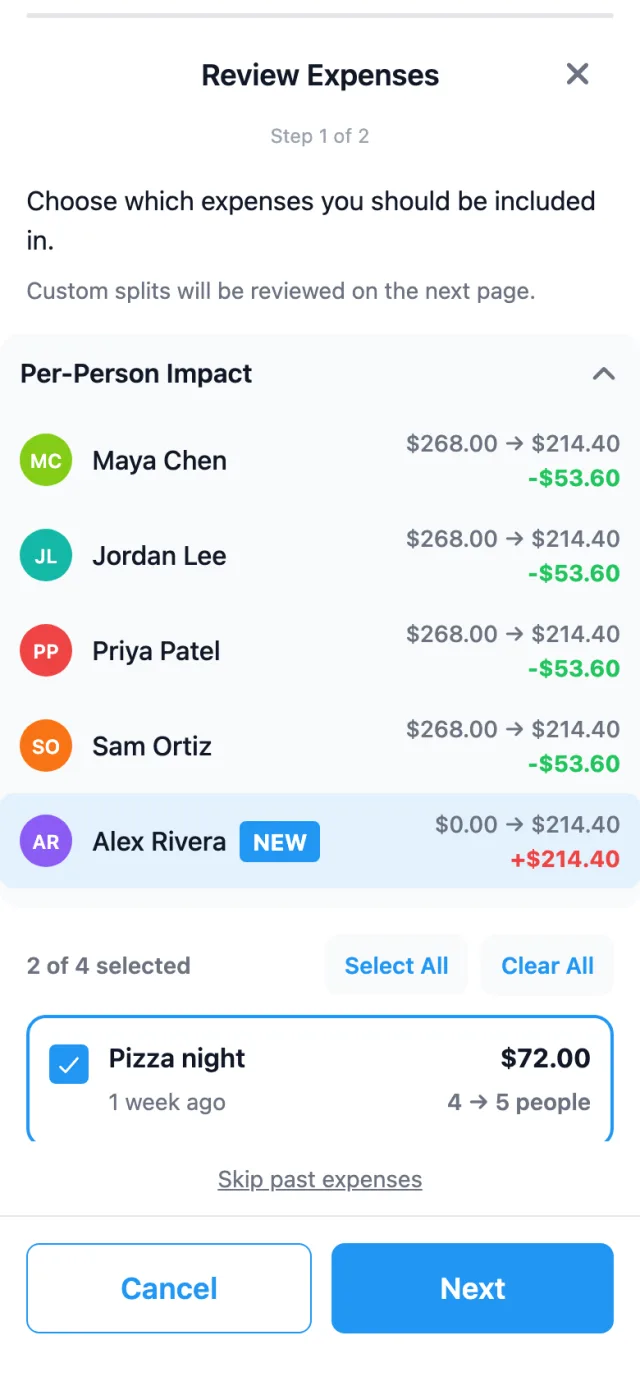
How it works
Alex joined the Tahoe weekend a day late, after six expenses were already in the group. Here's how he gets added to the ones he was part of.
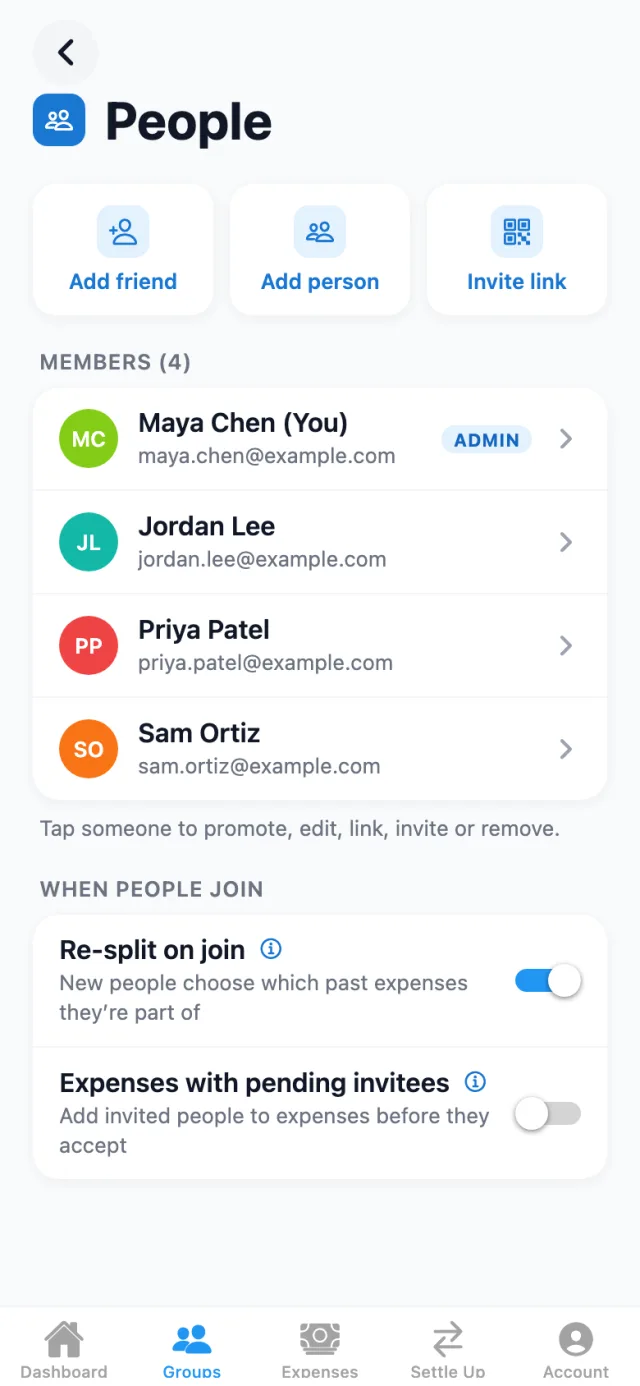
Turn on Re-split on join
A group admin switches it on in Group Settings, on the People page, under When people join. It's off by default, so groups that don't want it see no change.
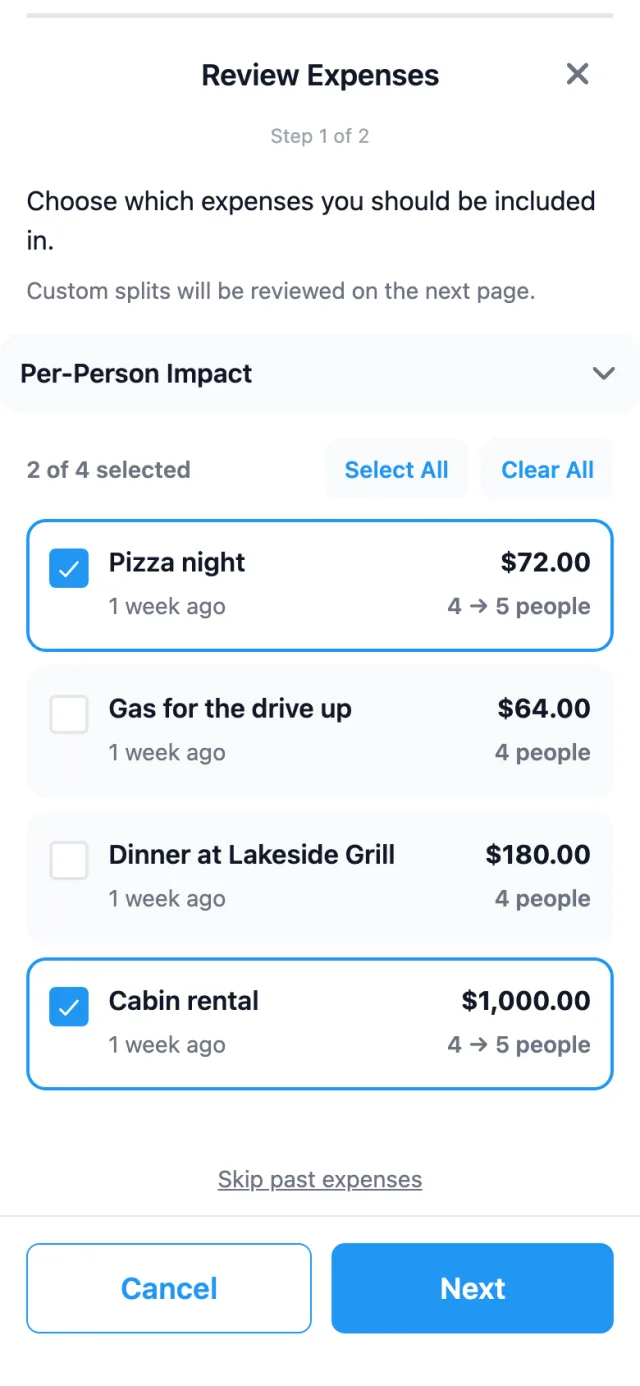
Review Expenses
When Alex accepts the invite, he sees the evenly split expenses from before he joined, all selected to start. He unchecks the Lakeside dinner and the gas for a drive he wasn't on, and keeps the pizza night and the cabin. Custom splits and receipts are reviewed on the next page.
Per-Person Impact
Before anything is saved, this card shows every member's total for the chosen expenses now and after the re-split. Alex is marked NEW. With the pizza and the cabin chosen, each of the others drops by $53.60 and Alex picks up $214.40.
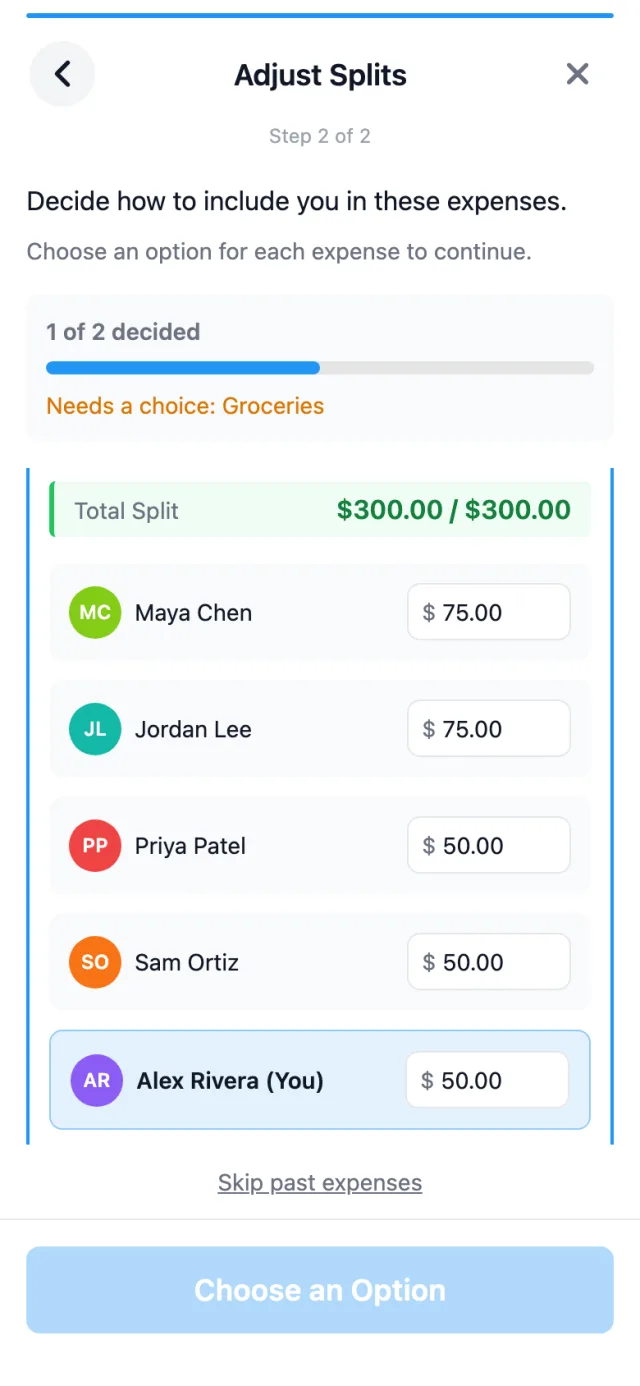
Adjust Splits
Custom splits and receipts each need a decision. The boat rental is edited by hand to $75, $75, $50, $50 and $50, which still adds up to the $300 total. The page counts the choices, 1 of 2 decided here, with Groceries still waiting on one.
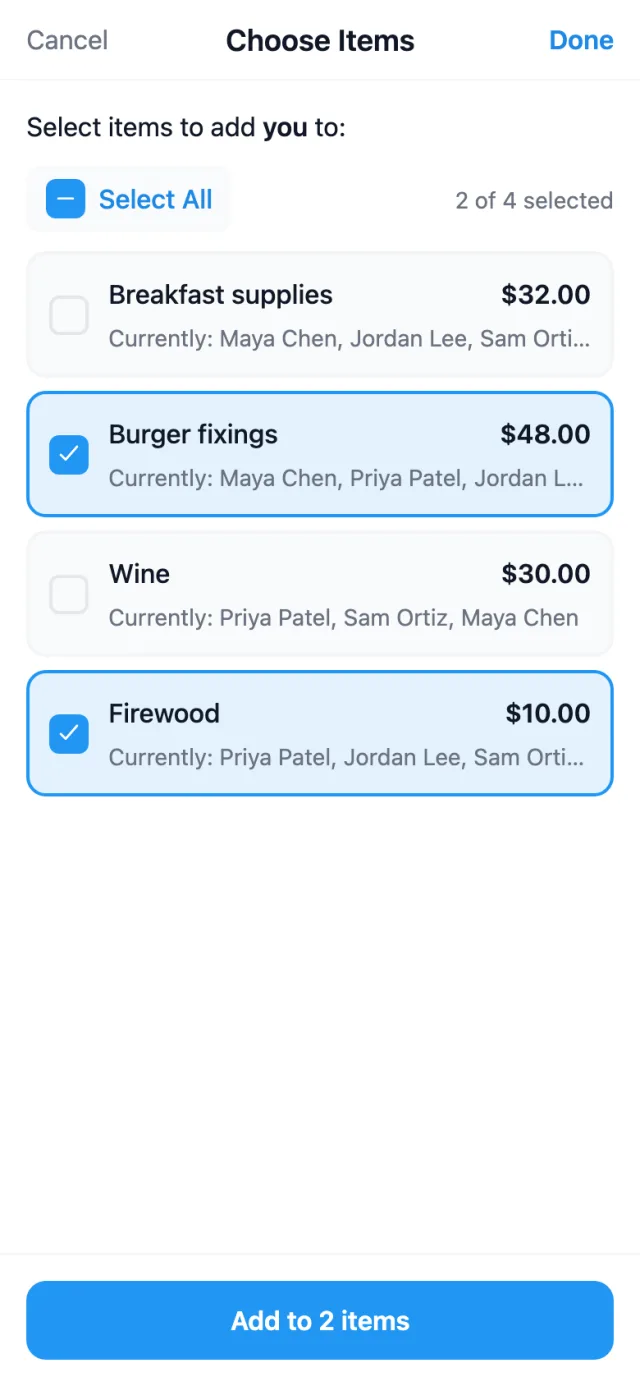
Choose Items
On the grocery receipt, Alex is added to the burger fixings and the firewood only. The other choices add him to every item, keep the receipt as it is, or convert it to an equal split, which drops the item details.
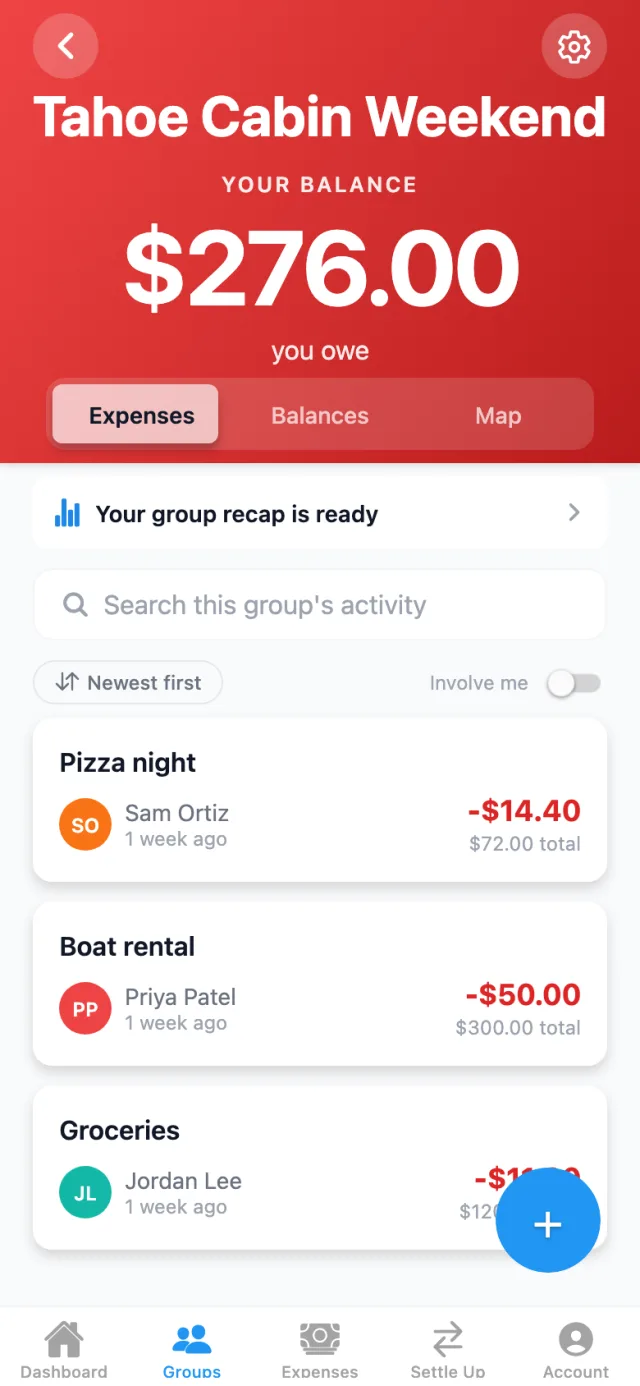
Balances update
Alex taps Resplit Expenses and the four expenses he chose are divided again with him on them. The group opens with his balance at $276.00 owed, and everyone's balance updates right away.
Who turns it on, and who answers
Re-split on join is a group setting, and only group admins can change it. It's off by default, and while it's off, someone joining a group doesn't change any expense that's already there.
- Someone accepts an invite: the wizard opens for them on the group screen.
- An admin adds someone who doesn't have an account: it opens for that admin, and only an admin can submit it. In Per-Person Impact, that person carries a Guest badge.
- A household joins: either member can answer, and the first answer counts. Only evenly split expenses are offered, since receipts and custom splits already itemize each person's share. An expense one of them is already on individually can't be picked, so nobody is charged twice.
Once it's submitted, the chosen expenses are divided again across everyone on them, the new person included, and the group's balances update. Expenses they didn't choose stay exactly as they were.
When you'd use it
Someone arrives partway through a trip
They fly in on day three. They pick the rental house and the boat day, and leave the first two dinners with the people who were there.
A new roommate moves in
The group already holds months of rent and bills. They tap Clear All, then pick this month's internet and the stock-up grocery run.
Plans grow after the first booking
A friend signs on to a birthday weekend after the cabin deposit and the cake are logged. They opt in to the cake and leave the deposit with the people who booked it.
Re-split runs when someone joins a group. It doesn't take anyone off past expenses.
Common questions
Have a group admin turn on Re-split on join in Group Settings, on the People page, under When people join. It's off by default. From then on, anyone who joins the group is asked which of the group's earlier expenses they were part of. If an admin adds someone who doesn't have an account, the admin answers instead.
A share that's already marked paid can't be changed. If one of the chosen expenses has a paid share, the re-split stops with "We couldn't re-split those expenses. Nothing was changed." Leave that expense out and submit again.
Yes, with a decision for each one on the Adjust Splits page. A custom split can be converted to equal, kept as it is without the new person, or edited by hand as long as the amounts still add up to the total. A receipt can add them to every item, keep its current assignments, add them to the items you pick, or become an equal split, which drops the item details. When a household joins, only evenly split expenses are offered.
SplitterUp doesn't send a notification for a re-split. Everyone's balance in the group updates once it's saved, so it's worth giving the group a heads-up.
They can tap Not now, and they'll be asked again the next time they open the group. Skip past expenses ends it: they aren't added to anything from before they joined, and they won't be asked again. They can still be added to individual expenses later.

Split expenses the smart way.
Available now on iOS, macOS, Android, and the web.
No install. Works in any modern browser. Sign in with Apple, Google, or email.
