 SplitterUp
Short answer
SplitterUp is the best receipt scanning app for splitting a bill. It extracts every line item, then a feature called SplitterUp Live shares the scanned receipt with the table so each person claims their own items from their own phone, including people who do not have the app. Tab also handles a single restaurant check. Splitwise scans receipts too, but only on Pro. Tricount and Spliit read receipts without offering item-level claiming.
Most expense apps now advertise receipt scanning. Very few of them do the thing you actually want, which is to turn a photo of a check into a per-person total without anyone reading the bill out loud.
The gap is that scanning a receipt and splitting a receipt are different features. Plenty of apps will read a total off a photo and create an expense. Far fewer will pull out each line, let people claim what they ordered, and then apportion tax, tip and service charges correctly on top.
Here is how the main options compare on that specific job. We build one of them, which is disclosed below and in the methodology.
What actually matters
Four things separate a useful scanner from a checkbox feature:
- Item-level extraction. Does it read each line, or just the total?
- Who does the claiming. If one person has to assign every item for eight people, you have automated the typing and kept the work. Only SplitterUp Live hands this to the table.
- Tax, tip and fees. Splitting items fairly and then dividing tax evenly puts the unfairness straight back.
- Whether everyone needs the app. Most tables are not all running the same app.
1. SplitterUp, best for splitting a receipt with the whole table
Best for: any restaurant check, including a table where not everyone has the same app.
SplitterUp reads each line off the receipt, then hands the claiming to the table instead of the payer. The feature is called SplitterUp Live: you scan once and share the receipt with the people around you. Friends nearby get an invite in SplitterUp on their own phone, with no group to create and no friend request to accept. That discovery uses location, so anyone with it switched off joins with the room code instead.
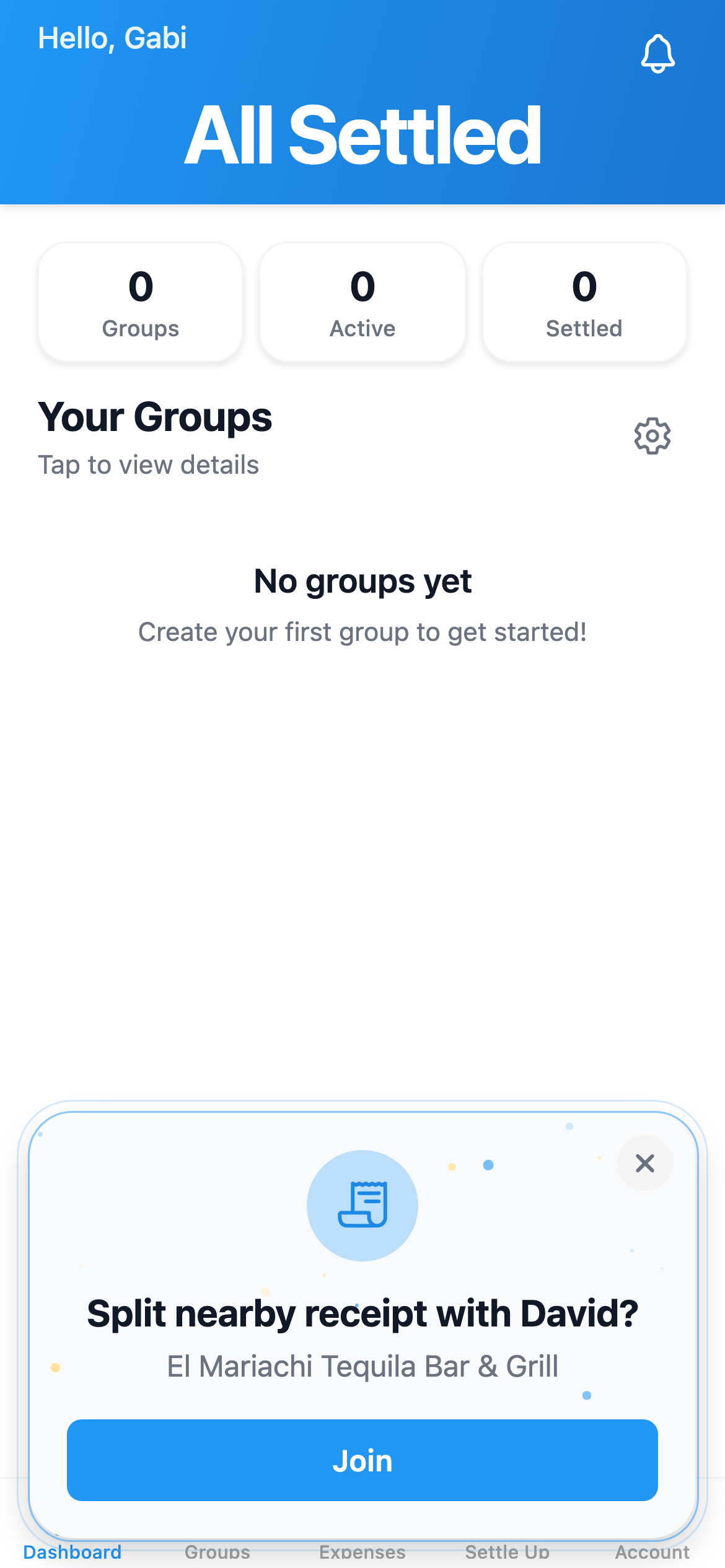
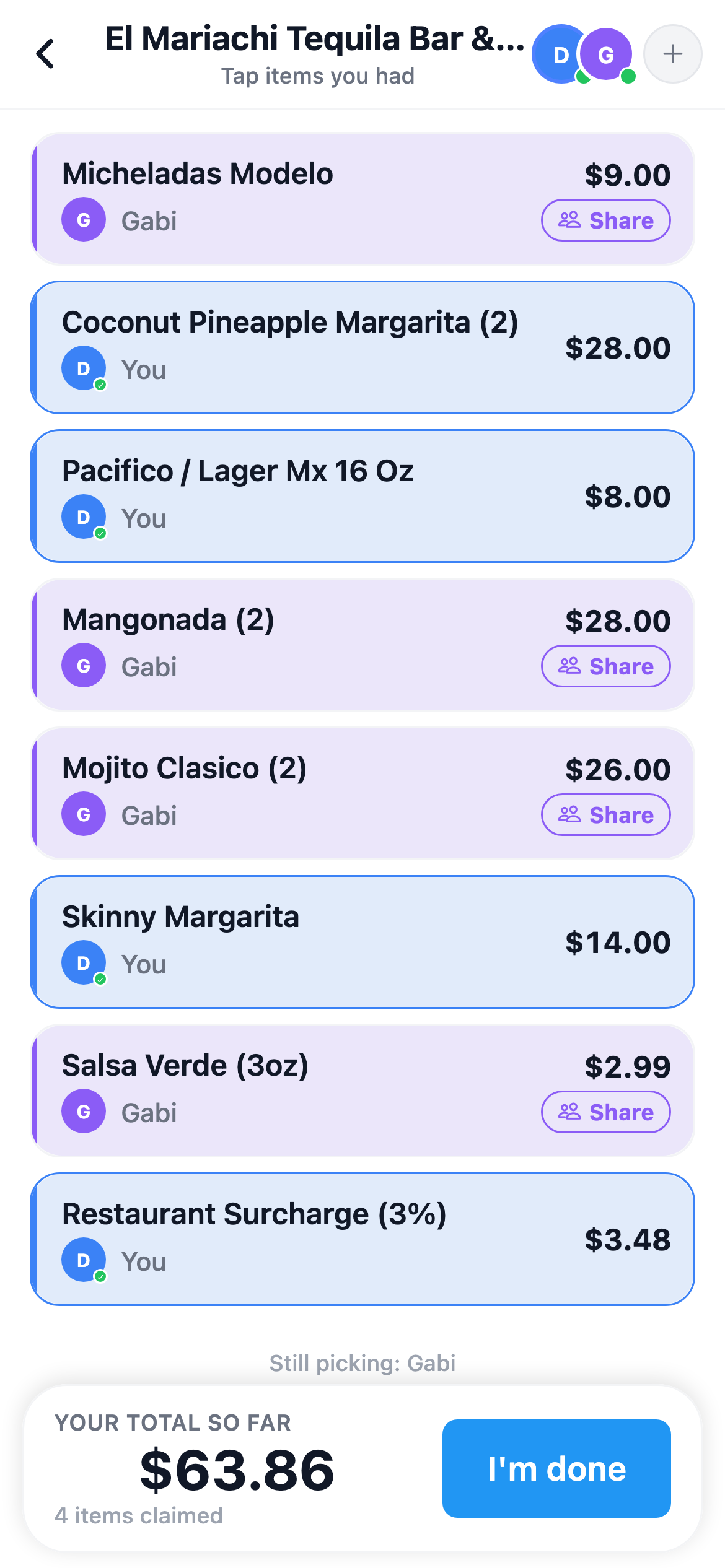
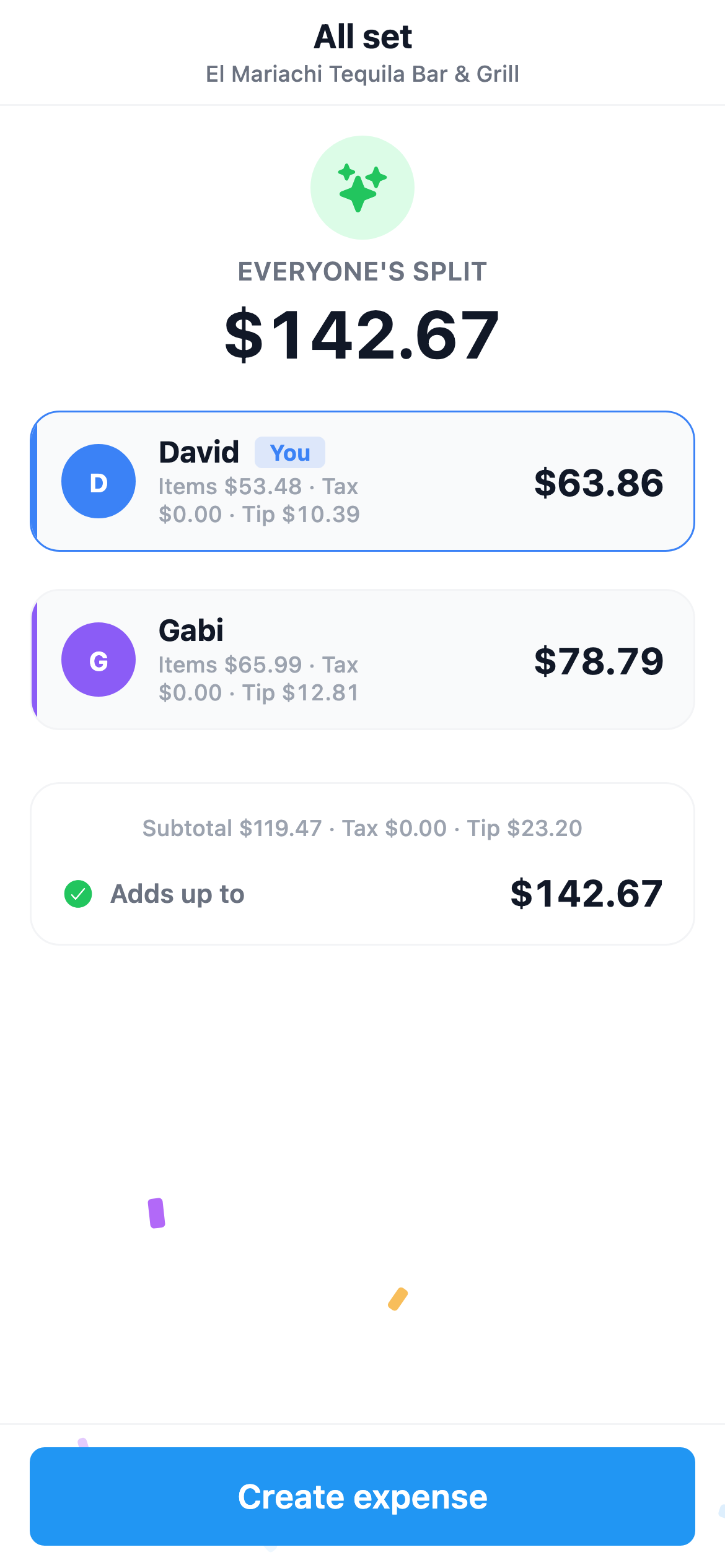
Look at the numbers on that last screen, because they show what most apps skip. David claimed $53.48 of items and carries $10.39 of the tip. Gabi claimed $65.99 and carries $12.81. Both are 44.8 percent and 55.2 percent of a $23.20 tip, matched to what each person actually ordered rather than divided by two. The reconciliation line confirms the shares add back up to the $142.67 printed on the check.
People without the app are handled separately. While hosting a split you can show a QR code, which anyone scans with their phone camera to join in a browser. They claim their items as a guest without downloading anything and without creating an account. If they want to keep it afterwards they can add an email, Apple or Google login and their balances carry over.
Where it falls short: it is a newer app with a much smaller user base than Splitwise, so your group is unlikely to already be on it. SplitterUp Live also assumes people are physically together, which does nothing for a receipt you are splitting three days later. You can still scan and assign items yourself in that case, but the part that makes it fast is gone.
Cost: free for a limited time. Create your account now and you keep Premium permanently; join after pricing starts and Premium is a one-time $4.99 purchase, never a subscription. Runs on iOS, macOS, Android and the web.
2. Tab, a single-check splitter
Suits: one restaurant check, nothing else.
Tab is built around exactly this job. Photograph the bill, tap the items you had, and it works out tax and tip without anyone entering prices. It is focused and does not ask you to set up a group first.
Where it falls short: it splits bills rather than keeping a ledger, so there are no running balances across months, no recurring expenses and no record of who owes whom over time. Tab does not publish pricing on its site, so check the store listing before you rely on it.
Cost: not published. iOS and Android.
3. Splitwise, the app your group may already have
Suits: groups already using Splitwise.
Splitwise does item-level receipt scanning, and it is the app your friends most likely already have, which matters when you are trying to get six people to use the same thing.
Where it falls short: receipt scanning is a Pro feature, so the free tier cannot use the thing you came for. The free tier also caps you at a daily limit Splitwise doesn't publish — most often reported as 3 or 4 expenses a day — and shows ads.
Cost: Pro was $59.99 per year at the time of writing. iOS, Android and web. See our analysis of whether Splitwise Pro is worth it for the full accounting of what that unlocks.
4. SplitMyExpenses, AI itemization and a CSV importer
Suits: a web-based tool with AI itemization and a Splitwise CSV importer.
SplitMyExpenses has AI receipt itemization and a Splitwise importer that takes an exported group or friend CSV and maps the names in it to real users. SplitterUp has its own Splitwise importer as well, so switching does not mean giving up item-level scanning.
Where it falls short: AI receipt itemization is not in the free plan at all, so scanning requires the paid tier. The free plan also only imports the past month of expenses.
Cost: free tier, or $3.99 per month for Unlimited. Web, iOS and Android.
5. HippoSplit, chat-first entry
Suits: people who would rather describe an expense than fill in a form.
HippoSplit is chat-first. You type what happened and it parses that into a split, with AI receipt and photo parsing behind it. It covers 150 or more currencies with live rates and supports itemized splits alongside equal, percentage and share splits.
Where it falls short: the free plan caps AI parsing at 20 scans per week, which is the feature the product is built around. It is also web-only for now, with native apps listed as coming later, so there is no offline use.
Cost: free tier, or $4.17 per month billed annually at $49.99. Web.
6. Tricount, a free trip tracker
Suits: a free trip tracker where scanning is a bonus.
Tricount is genuinely free with no expense caps and no ads, and it includes basic OCR. It is owned by bunq, a European neobank that bought it in 2022, which is why it costs nothing: the app is a way to bring people to bunq, and sign-up runs through bunq's onboarding. For a one-off trip where you mostly need a shared ledger, that is often enough.
Where it falls short: the scanning is basic rather than item-level, so it does not give you per-person claiming off a restaurant check.
Cost: free. iOS and Android.
7. Spliit, open source and self-hostable
Suits: people who want to own their data.
Spliit is free and open source, needs no account, and can be self-hosted. It added AI receipt scanning that creates an expense from a photo, and there is a native iPhone app alongside the web version.
Where it falls short: the scanning creates an expense rather than an itemized claim sheet, so it does not solve the restaurant-check case. It is donation-funded, with no company behind it if something breaks, and there is no Android app yet.
Cost: free. Web and iOS.
Quick comparison
| App | Item-level | Others claim their own | Works without the app | Cost to scan |
|---|---|---|---|---|
| SplitterUp | Yes | Yes | Yes, via SplitterUp Live | Free now |
| Tab | Yes | No | No | Not published |
| Splitwise | Yes | No | No | Pro only |
| SplitMyExpenses | Yes | No | No | Paid plan |
| HippoSplit | Yes | No | Link, no signup | 20 scans/week free |
| Tricount | No | No | No | Free |
| Spliit | No | No | No account needed | Free |
The part most scanners get wrong
Assigning every item to a person splits the subtotal, not the bill. Tax and tip still have to land somewhere, and dividing those per head undoes the itemization you just did. Tax was charged on the expensive items, so it should follow them.
The case that catches apps out is the third category, the mandatory charges that are neither tax nor a tip you chose. A service charge. A surcharge. An automatic gratuity on a party of six. The credit-card, health and living-wage fees some cities and restaurants add as their own lines.
SplitterUp classifies every line on a receipt as a product, a tax, a discount, a tip or a fee. Anything classified as a fee is apportioned across the party in proportion, the same way tax and tip are, and is never offered as something to claim, because nobody at the table ordered the service charge. You can see one in the claiming screenshot above, the 3 percent restaurant surcharge sitting in the item list. Discounts work the same way in reverse, arriving as negative lines rather than being quietly dropped, so the total the app reaches is the total printed on the check.
How we compared these apps
We checked every claim here against each app's own site and store listing rather than against reviews, and we tested the free tier as a new user would meet it. Prices and limits are as of September 2026 and do change. SplitterUp is our own app, which is why this page says plainly where SplitterUp falls short.
For a broader view of these apps beyond receipt scanning, see our roundup of the best expense splitting apps, or how receipt scanning works if you want the mechanics rather than the comparison.
Frequently Asked Questions
What is the best receipt scanning app for splitting a bill?
SplitterUp, because it extracts every line item and SplitterUp Live lets each person claim their own from their own phone, including people who do not have the app and join through a QR code in their browser. Tab also handles a single restaurant check.
Does Splitwise scan receipts for free?
No. Splitwise includes item-level receipt scanning on Pro, which was $59.99 per year at the time of writing. The free tier cannot use it, shows ads, and caps you at a daily limit Splitwise doesn't publish — most often reported as 3 or 4 expenses a day.
Can you scan a receipt and split it with someone who does not have the app?
Yes, using SplitterUp Live. While hosting a split you can show a QR code that anyone scans with their phone camera to join in their browser, claim their own items as a guest, and see what they owe without downloading anything or creating an account.
How should tax and tip be split on a scanned receipt?
In proportion to what each person claimed, not evenly per head. Dividing tax and tip equally reintroduces the same unfairness as splitting the whole check equally, because the tax was charged on the more expensive items.
Scan the receipt, let everyone claim their own
Free for a limited time. Create your account now and you keep Premium permanently; join later and it's a one-time $4.99. Works on iOS, macOS, Android and the web.